Archive
THIS is how to watch hockey
I’ve only been to a few hockey games in my life, but I enjoyed every one of them. My favorite was a game at West Point (I grew up in Connecticut) where after the game the two goalies, last in line to shake hands, threw off their gloves at the same time and started a massive brawl. It was hilarious to see the MP’s (military police) run on the ice in their boots to try to break up the fight – slipping and sliding everywhere.
But I digress. I saw on ESPN.com that the NHL had their second-ever outdoor game today in Buffalo, NY at Ralph Wilson Stadium (home of the NFL’s Buffalo Bills). 71,217 rabid fans in the snow for a hockey game. The rink ran between the 16 yard lines.

Photo gallery: http://sports.espn.go.com/espn/flash/zoomGallery?section=gen&photoGalleryId=3176292
Latitude XT more thoughts
Screen and writing
The screen on the XT looks nice when running. On par with the quality of the display on the D620 and D630. The resolution is 1280×800, which in my mind is a lot nicer than the 1024×768 screen on the Lenovo X61t for Outlook 2007, Feed Demon, and other apps that can take advantage of a wider screen format.
When I first opened the box and saw the screen I thought there was a static film on it to protect the screen in shipping. That’s not the case, unfortunately. You can’t see a difference when the display is running, but when it’s off it just looks opaque. There’s also a discoloration around the outside of the screen area – possibly glue for the (I guess permanent) protective film. Kind of annoying from a quality perception standpoint – especially for such an expensive laptop.
That film also makes the pen writing experience a bit annoying since the film is a bit rubbery when using the pen tip. William asked me in my last post how the writing experience was when writing small – and the rubbery film kept grabbing the tip and made it a bit difficult to write small. It was possible, and maybe as the tip “wears in” a bit it would be smoother to write small. Writing big wasn’t really an issue because I wasn’t trying to be as fine.
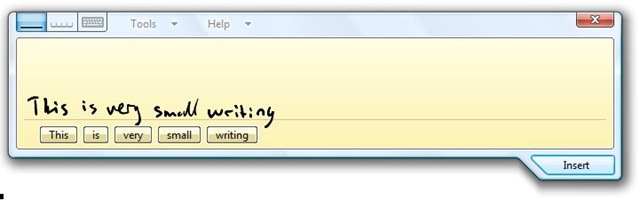
The finger touch capacity of the the screen actually works fairly well. Accuracy is decent enough but I’m not sure I’d want to use my finger as a mouse all the time. It would take some training anyway since I’m so used to NOT touching the screen. Ironically the first time I tried to do the writing sample above I wound up drawing a series of small dots as I slowly brought the pen towards the screen – my pinky finger was also wresting on the display. That seems to have been a fluke as I have not been able to replicate that error. Maybe it’s learning to be smarter?
Back to the pen for a minute – I tried the small writing sample a number of times (trying to figure out how to get a screenshot of the input panel with it not actually inserting the text). Unlike the Lenovo pen (and many others I’ve seen) the back of the pen is NOT an eraser! BAD CHOICE DELL! Instead you have to depress the smaller of the two buttons on the pen, which is recessed a bit. You effectively have to push in and up (towards the back) of the pen on the button while you simultaneously press the pen’s tip to the screen. My finger still hurts a bit from that exercise. If I was Dell I’d figure a way to get get another pen style out on the market ASAP.
Fit and finish
The laptop itself is actually pretty nice. There is no latching mechanism to keep the screen closed – rather it is spring loaded (magnetic maybe?) to keep it closed. Either way, it works well. There are also some rubber tabs that stick up on the corners of the wristpad that lock into indentations on the screen to keep it from rotating when closed. My wrists seem to lay across these a bit while typing, but it’s not too uncomfortable.
Then there’s that film on the screen, complete with annoying border. You can’t see it during normal operation, but I just realized you can see it with a lot of light in the room (I opened the shades in our dining room to take some pictures).
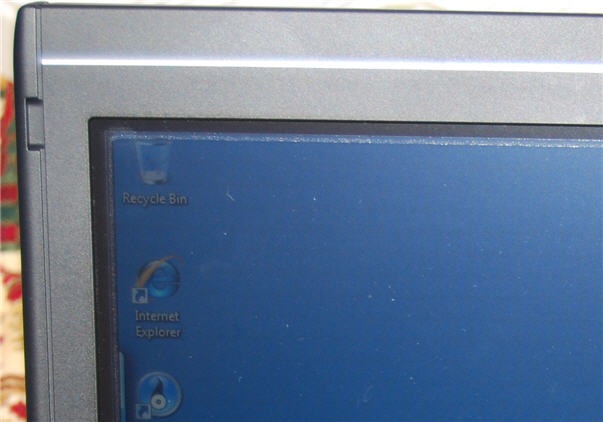
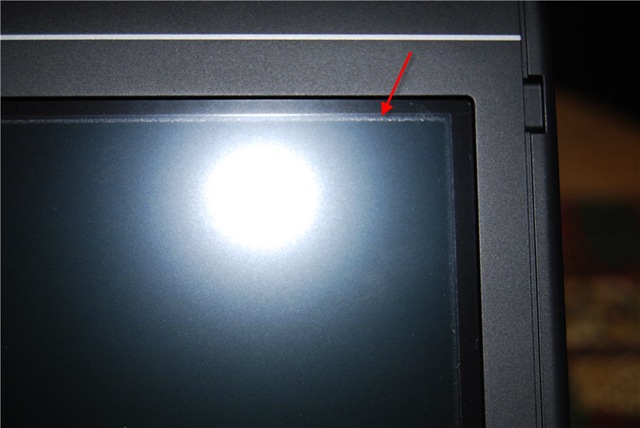
The laptop is a bit top-heavy when the screen open in laptop mode – at times I’ve felt like it might tip over backwards (though it hasn’t). There’s also a number of feet on the bottom of the laptop to keep it slightly raised off a flat surface. For cooling these seem to work really well on a table or lap desk. Surprisingly the machine is also running fairly cool sitting next to me on the couch, where I know the bottom vents are getting blocked by the fabric of the cushions.
Unfortunately the feet aren’t all quite the same height, so sitting on a flat surface the laptop is just a smidge wobbly side to side (high center).
I’m happy to report that the onboard SD card reader successfully accessed my 4GB card we have for our Nikon D40x, so it’s SD-HC capable – I was worried about that.
The Windows battery life estimates are all over the place (as usual) so I can’t give a good reading on what battery life is like. I’ve had the laptop running for the past 90 minutes or so and there is purportedly about 60% of battery left. I have WiFi running and I try to keep the screen active when it turns off. I’ve used it for some screenshots, but other than that it’s been idle.
Of course both Vista and Google are indexing the HD, so that I’m sure is playing a factor. I’m not a fan of Dell’s decision to include the Google bits, but that’s a personal decision and there are probably just as many people that are happy about it.
Out of the box
I’ve had a few issues and annoyances with the Dell OS build so far. There were 18 patches or updates available for the machine from Microsoft Update just for what came from Dell (haven’t thrown Office or anything else on there yet).
I put it into suspend mode to take some pictures of the screen with no image and when I resumed Dell’s network card power management tool had crashed (according to Windows error reporting).
The first time I had the machine up and running the window borders seemed to be running in 120dpi mode (they were huge compared to the rest of the screen contents). That went away with the first reboot, so I’m not sure what was going on. Still, strange.
And of course Dell put Round Rock, TX as the default location for the weather widget in the Vista Sidebar (just like they make the time zone and time US-Central). Ironically they left the temperature display in Celsius – so it’s 11 degrees and sunny in Texas right now evidently!
The default setting for the point stick are WAY too slow (it takes forever to get anywhere) and the track pad is a bit too sensitive to accidental taps. These are both adjustable settings, but out of the box it’s annoying. The track pad is also a lot smaller than the track pad on the D620/630. This is a bummer for me since I use the vertical scroll feature of the pad a lot – with the smaller pad I seem to scroll when I don’t want to. Sure this is user training, but I don’t understand why they went with a smaller pad surface when they obviously have the room.

 Nathan's Occasional Blog