Archive
When progress bars let you down
Backup estimate: 686 MB
Backup job so far: 48.5 GB

I love the wait…
BillG’s last day
We all have last days… Here’s what my former boss’ boss’ boss’ last day is going to be like later this year.
http://on10.net/blogs/larry/Bills-Last-Day-CES-2008-Keynote-Video/Default.aspx
Dell Latitude XT: the verdict
Also see my other Latitude XT posts: pictures, first impressions, and more thoughts.
I spent most of yesterday using the XT from the comfort of my couch at home while watching bowl games. How could life get any better … new tech toys and HDTV football. LOVELY! I spent most of the afternoon catching up on reading blogs, installing Office 2007 and letting my mailbox sync up from our corporate Exchange server, and some other basic tasks. Nothing “heavy”.
While I don’t purport to have spent days and days using Dell’s new tablet to it’s fullest extent, I’ve played enough with it to draw up some decent conclusions.
- This is a decent computer. It’s not going to break any speed records, but it’s not a slouch either. I wouldn’t hesitate to recommend this platform to a business user who wants/needs a tablet for everyday use (web, email, Word, Excel, PowerPoint, etc.). This is not the machine for developers or gamers. As always, if you want to run virtual machines I’d recommend an external hard drive (especially with this box’s 5400rpm ATA disk).
- It’s a bit slow to boot with the Dell factory image (haven’t made a fresh build to compare though). 18 seconds from power button to Vista’s “green crawl”; at 33 seconds the screen goes black and the box works on loading drivers … for a long time (HD activity dies out for a while too – odd). At 1 minute 4 seconds the Vista logon screen pops up and is ready to go.
- The quality is okay, but it’s definitely a version 1 product. The screen really bugs me for pen input with the (glued on?) “rubbery” coating. Variations in “feet” height and the screen weight compared to the base both make the system a bit wobbly on a table or lap desk.
- In laptop mode the computer runs remarkably quiet and cool, even sitting on a couch with the bottom vents restricted by fabric. In slate mode it’s still quite, but the whole thing heats up noticeably, especially around the screen hinge where you’d naturally hold it. It’s not horrible, but surprising. Are they venting this thing through the keyboard?
- The screen is VERY readable from all angles – notably so. This is the first tablet I’ve seen where I can easily read the whole page in slate mode without tilting the device up and down for optimal viewing (and I haven’t seen many of the newest ones so don’t hold me to this). The size of the screen is nice in laptop mode with the widescreen capabilities; in slate mode the height of the display takes some getting used to and I’d love to see it wider.
- I don’t like the pen compared to the X61t or Toshiba offerings, and the screen coating doesn’t help with writing ease. It’s comfortable to hold but difficult to use the buttons. Dell, PLEASE put an eraser button on the back of the pen instead of causing finger gymnastics to erase something.
Overall I think Dell did pretty good for their first foray into the tablet world. Sure they need to make some upgrades (SATA hard drive anyone?) but it’s not bad. I wish Dell would make ALL latitudes compatible with the standard docking stations (Lat D430 and XT have to use a custom media bay).
Pricing is a heafty premium compared to the Latitude D430, it’s closest relative. With our corporate discounts our fully loaded D630’s run around $1600. This Latitude XT cost our organization about $2400 (3GB RAM, U7600 dual core processor, pre-N WiFi, Vista Ultimate, 3 year Gold support with CompleteCare).
Am I going to use it as my primary machine? Not right now. We forgot to put the media base and the Bluetooth card on the order (we walked through the specs on the phone with our rep before it was on Dell’s website). I’d also want the slim battery base for travel.
Should you buy one? Maybe. That’s a pretty personal decision. Worst case is you get it, hate it, and return it for a refund (check with Dell on their policies for that). While a tablet is pretty cool to have, for me personally I’ve found that I’m not so sure how often I’d actually use it in tablet mode. But that’s just me.
Hope these reviews have helped you!
THIS is how to watch hockey
I’ve only been to a few hockey games in my life, but I enjoyed every one of them. My favorite was a game at West Point (I grew up in Connecticut) where after the game the two goalies, last in line to shake hands, threw off their gloves at the same time and started a massive brawl. It was hilarious to see the MP’s (military police) run on the ice in their boots to try to break up the fight – slipping and sliding everywhere.
But I digress. I saw on ESPN.com that the NHL had their second-ever outdoor game today in Buffalo, NY at Ralph Wilson Stadium (home of the NFL’s Buffalo Bills). 71,217 rabid fans in the snow for a hockey game. The rink ran between the 16 yard lines.

Photo gallery: http://sports.espn.go.com/espn/flash/zoomGallery?section=gen&photoGalleryId=3176292
Latitude XT more thoughts
Screen and writing
The screen on the XT looks nice when running. On par with the quality of the display on the D620 and D630. The resolution is 1280×800, which in my mind is a lot nicer than the 1024×768 screen on the Lenovo X61t for Outlook 2007, Feed Demon, and other apps that can take advantage of a wider screen format.
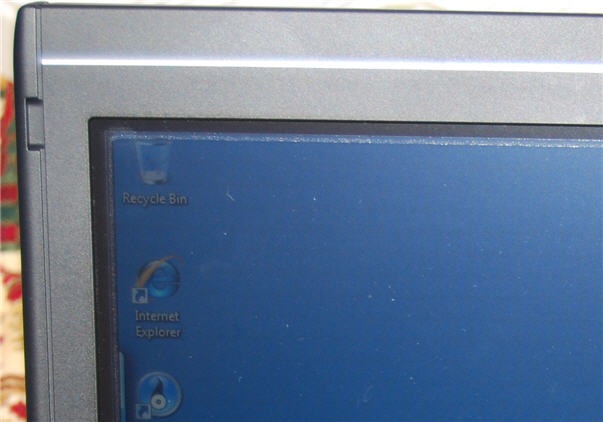
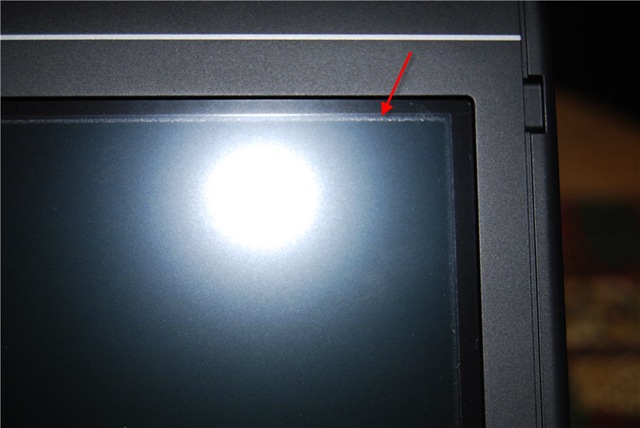
When I first opened the box and saw the screen I thought there was a static film on it to protect the screen in shipping. That’s not the case, unfortunately. You can’t see a difference when the display is running, but when it’s off it just looks opaque. There’s also a discoloration around the outside of the screen area – possibly glue for the (I guess permanent) protective film. Kind of annoying from a quality perception standpoint – especially for such an expensive laptop.
That film also makes the pen writing experience a bit annoying since the film is a bit rubbery when using the pen tip. William asked me in my last post how the writing experience was when writing small – and the rubbery film kept grabbing the tip and made it a bit difficult to write small. It was possible, and maybe as the tip “wears in” a bit it would be smoother to write small. Writing big wasn’t really an issue because I wasn’t trying to be as fine.
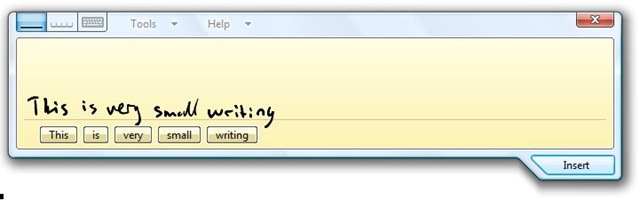
The finger touch capacity of the the screen actually works fairly well. Accuracy is decent enough but I’m not sure I’d want to use my finger as a mouse all the time. It would take some training anyway since I’m so used to NOT touching the screen. Ironically the first time I tried to do the writing sample above I wound up drawing a series of small dots as I slowly brought the pen towards the screen – my pinky finger was also wresting on the display. That seems to have been a fluke as I have not been able to replicate that error. Maybe it’s learning to be smarter?
Back to the pen for a minute – I tried the small writing sample a number of times (trying to figure out how to get a screenshot of the input panel with it not actually inserting the text). Unlike the Lenovo pen (and many others I’ve seen) the back of the pen is NOT an eraser! BAD CHOICE DELL! Instead you have to depress the smaller of the two buttons on the pen, which is recessed a bit. You effectively have to push in and up (towards the back) of the pen on the button while you simultaneously press the pen’s tip to the screen. My finger still hurts a bit from that exercise. If I was Dell I’d figure a way to get get another pen style out on the market ASAP.
Fit and finish
The laptop itself is actually pretty nice. There is no latching mechanism to keep the screen closed – rather it is spring loaded (magnetic maybe?) to keep it closed. Either way, it works well. There are also some rubber tabs that stick up on the corners of the wristpad that lock into indentations on the screen to keep it from rotating when closed. My wrists seem to lay across these a bit while typing, but it’s not too uncomfortable.
Then there’s that film on the screen, complete with annoying border. You can’t see it during normal operation, but I just realized you can see it with a lot of light in the room (I opened the shades in our dining room to take some pictures).
The laptop is a bit top-heavy when the screen open in laptop mode – at times I’ve felt like it might tip over backwards (though it hasn’t). There’s also a number of feet on the bottom of the laptop to keep it slightly raised off a flat surface. For cooling these seem to work really well on a table or lap desk. Surprisingly the machine is also running fairly cool sitting next to me on the couch, where I know the bottom vents are getting blocked by the fabric of the cushions.
Unfortunately the feet aren’t all quite the same height, so sitting on a flat surface the laptop is just a smidge wobbly side to side (high center).
I’m happy to report that the onboard SD card reader successfully accessed my 4GB card we have for our Nikon D40x, so it’s SD-HC capable – I was worried about that.
The Windows battery life estimates are all over the place (as usual) so I can’t give a good reading on what battery life is like. I’ve had the laptop running for the past 90 minutes or so and there is purportedly about 60% of battery left. I have WiFi running and I try to keep the screen active when it turns off. I’ve used it for some screenshots, but other than that it’s been idle.
Of course both Vista and Google are indexing the HD, so that I’m sure is playing a factor. I’m not a fan of Dell’s decision to include the Google bits, but that’s a personal decision and there are probably just as many people that are happy about it.
Out of the box
I’ve had a few issues and annoyances with the Dell OS build so far. There were 18 patches or updates available for the machine from Microsoft Update just for what came from Dell (haven’t thrown Office or anything else on there yet).
I put it into suspend mode to take some pictures of the screen with no image and when I resumed Dell’s network card power management tool had crashed (according to Windows error reporting).
The first time I had the machine up and running the window borders seemed to be running in 120dpi mode (they were huge compared to the rest of the screen contents). That went away with the first reboot, so I’m not sure what was going on. Still, strange.
And of course Dell put Round Rock, TX as the default location for the weather widget in the Vista Sidebar (just like they make the time zone and time US-Central). Ironically they left the temperature display in Celsius – so it’s 11 degrees and sunny in Texas right now evidently!
The default setting for the point stick are WAY too slow (it takes forever to get anywhere) and the track pad is a bit too sensitive to accidental taps. These are both adjustable settings, but out of the box it’s annoying. The track pad is also a lot smaller than the track pad on the D620/630. This is a bummer for me since I use the vertical scroll feature of the pad a lot – with the smaller pad I seem to scroll when I don’t want to. Sure this is user training, but I don’t understand why they went with a smaller pad surface when they obviously have the room.
Latitude XT first impressions
Unfortunately I had a few meetings and other tasks to get to this morning so it took me a while to get some time with the machine. I made a Ghost image of the hard drive before I even did the first boot – good suggestion for anyone getting a new box.
But image done I now have had a chance to get the box up and running. My primary machine is a Dell Latitude D630 with a snappy SATA hard drive, 4GB of RAM, etc. According to Vista’s Experience Rating my machine is a 4.0 (not bad for a laptop).
The Latitude XT has a 5400rpm ATA hard drive which I was bummed to hear about at first since I’m losing transfer speed, etc. I was quite surprised to see the Experience Rating of the tablet is a 3.5 however. Not too shabby!

Typing seems pretty normal for the current Latitude keyboards so that’s nice. This is still a standard factory build so all the Google stuff is on there indexing and thrashing the drive – thanks. Still, everything seems pretty snappy so far. Might have to take this baby home and play with it some.
I’ve got a trip for a week-plus next week so I want to see if I can get happy enough with the box to take it with me. Sure would be nice to watch a movie on the tablet on the plane … good test of battery life that would be too. This has the 6-cell battery.
I’ll keep you all posted as I spend more time … for now I need to get my last expense report of 2007 in!
Dell Latitude XT Tablet!!!
Update: Also see my other Latitude XT posts: first impressions, more thoughts, and the verdict.
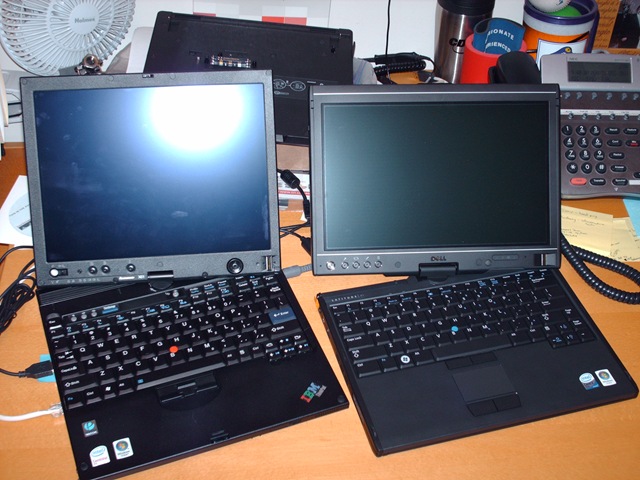
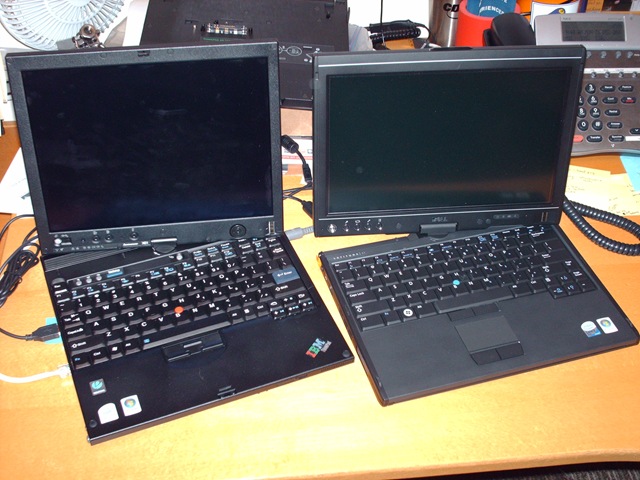
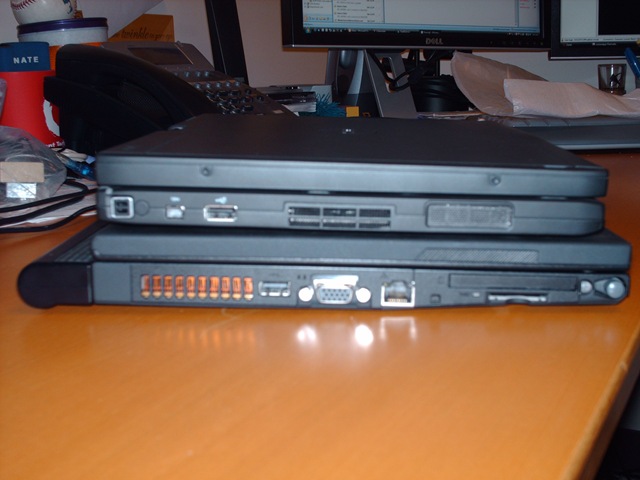
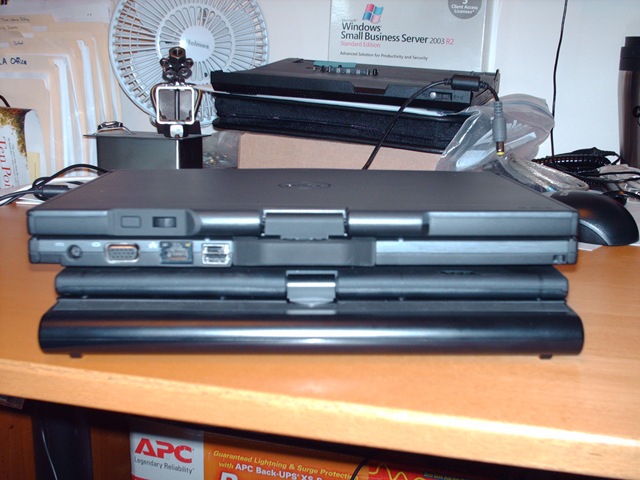
Looks like my firm is one of the first to get Dell’s new tablet! So for all of you out there wanting to see it, here are some pictures next to a Lenovo X61T tablet. The Dell is a widescreen so it’s a bit shorter and wider, and the Lenovo I am playing with has an extended battery hanging off the back.



Next comes making a factory image of it so I can get back to default, and an actual build and test. Might keep it if the performance is halfway decent. 🙂
Update: Welcome Engadget readers! And I was remiss to not shout out a special thanks to my good friend Barton who is lending me the Thinkpad. Also be sure to check for my other posts as I get more acquainted with the Latitude XT.
Kaitlyn says…
Kaitlyn is TOTALLY into princess mode at this point in her life, and has been for a couple months. Every nice dress someone has on (be it a baby or a grown woman) is a princess dress. She even asked Santa for a “Princess Christmas”, which he delivered.
Kaitlyn is also in question mode. Most things we say to her usually get sent right back to us with her cute little questioning voice inflexion.
“Time to get in the car Kaitlyn.” -> “Time to get in the car?”
KC from time to time will ask if I’m a princess, or if Mommy is a princess – both answers are no. We’re king and queen of course! [Which inevitably leads to a question from her inquiring if I’m a queen – but I digress.]
This morning when we were packing into the car for the family commute into Bellevue KC asked if Alicea was a princess, to which Mommy replied that she was a queen. I piped in that Mommy is in fact a domestic goddess.
KC: “Mommy’s a messed up goddess?”
🙂 Had to share. Enjoy your day!
Merry Christmas!
“Merry Christmas, everyone.”
I hope each one of you (that’s right, all three of you that read my blog) had an awesome Christmas. Here at our place we’ve been completely overwhelmed with family, food, and fantastic gifts!
Kaitlyn’s been bouncing off the walls, almost literally, with all the “princess Christmas” gifts she got from Santa and all our relatives. Favorites include a Cinderella doll and a fairy princess dress, complete with wings. I’ve never seen Kaitlyn so happy, jumping and spinning and yelling with each gift she got to open. Too fun.
The highlight of non-Kaitlyn presents has to be the video conferencing system I got so my folks can see Kaitlyn (and she can see them) during our weekly calls. I think my mom flipped over that one. 🙂
But the best gift for everyone this year is that my parents are here for the holidays. Kaitlyn totally latched on to my dad, aka Poppy, and they’ve been spending most of their days in the play room together. It’s awesome to have them here, and they’re in town through Saturday to boot! YAY!
Coming up this afternoon and evening is a great meal (Honey Baked Ham – oh yeah) and some SNOW! WOOHOO!
Let it snow!
Oh yeah. That’s right. I said SNOW!
I love snow – have ever since I was a little kid. And it wasn’t because I didn’t want to go to school (I liked school); but I love being out in the snow.
Now that I’m grown up it’s still magical. Sure I need to shovel the driveway. Sure it’s a pain in the arse to put on chains. Sure there are lots of idiots out there who don’t know how to act in the snow. But it’s still fun!
It started snowing about 2p yesterday afternoon while we were in North Bend doing some shopping. Kaitlyn loved seeing the snowing coming down. As an added bonus we got to see the “Santa Train” on the move as we were driving home in the blowing snow. Now if that doesn’t say “Happy Holidays” I don’t know what does!
Unfortunately Kaitlyn was up through the afternoon so she didn’t go down for her nap until about 3:45p. We woke her up about 7p so we could go outside in the snow for a bit. It was still snowing and Kaitlyn loved walking around in the falling snow (there was about 3-4 inches on the ground) and looking at all the Christmas lights. It was blowing hard though, so it was pretty cold. We didn’t stay out for long.
Now through all this I kept looking at the weather reports, etc. (yes, I admit I’m a weather geek) because I am drumming this weekend at church. So I was trying to decide whether to drive to Bellevue Saturday night and crash on someone’s couch, or sleep in my own bed and slog it in the morning. I finally decided on the latter.
This morning at 4:30a I woke up and peeked out the window … there’s 10-12 inches of snow on the ground – much higher in drifts and were our city’s plow drivers decide to leave their deposits. Why can’t these guys clear out the entrances to the alleys?!? After a few minutes of maneuvering to get out of our driveway I had to blow through a 2+ foot snow bank at the end of our alley. GRR.
Anyway, I made it in just fine. And it’s still snowing up there. LOVELY! Here’s the view from our front room this morning.

I wonder how much more snow will fall today before it changes to rain. Then comes flooding over the next few days with a couple more storms coming in from the Pacific. Oh – and don’t forget the expected wind storm. Tis the season!

 Nathan's Occasional Blog