Archive
Ooma phone number port-out problem solved
Tl;dr = Ooma lines are “land lines” not mobile lines, and the number port process is different. Make sure your new service provider knows it’s a land line transfer. More details below…
I decided to document my experience (and the solution) here after seeing many people share struggles of moving phone numbers off of Ooma in general, and to Xfinity Mobile specifically. I hope this helps you solve your number porting frustration, or ideally prevent frustration from happening.

You have a home phone!?
We’re old school and have had a home phone for a long time. Back in the day it made sense because our youngest kiddo didn’t have a cell phone, and we wanted to make sure he (or a babysitter) had an easy way to call one of us or 911 in an emergency. We got a local “land line” phone number from Comcast/Xfinity’s Voice service to meet our needs. Over the subsequent ~15 years we’ve also used that number for a lot of our financial accounts and more mundane stuff like Safeway Rewards, etc.
We moved to a different neighborhood in our small town 6 years ago and for dumb FCC reasons Xfinity couldn’t move our home number to our new address. Even though it’s VoIP. Our house is in the middle of what used to be a forest, and long ago somebody drew a dial plan map that put is in the next town over. LAME!
Simply dropping that phone number seemed like a bad idea for the same reasons we had it in the first place (above), so I signed up with Ooma and ported the number over there. We’ve had no issues with their service, but they definitely lack a few nice-to-have features (like SMS texting on the line).
These days we actually don’t even answer our home phone line, so making sure our home phone rings somewhere we can pick it up doesn’t matter. In fact, killing our wireless home phones that just bother us when they ring is actually a net positive here. BUT we don’t want to let that phone number back onto the open market to be assigned to someone else because we have so much tied to it.
The problem
Tangentially, we recently cancelled our Xfinity TV service and went internet-only (I’d kill for a symmetric 1Gbps service from someone … there’s fiber in the neighborhood but Centurylink only offers a lame 30Mbps plan to our address for some dumb reason). While going through that service change I tried to do Xfinity Voice again (nope – dumb FCC map hasn’t been updated) and then the agent offered Xfinity Mobile for $15/mo and a free phone. Same price. More features. Free phone that will just live on silent mode in our home office. SOLD!
My brand new Motorola moto g stylus 5G arrived the other day (wow, great branding there – rolls right off the tongue) and I hopped on Xfinity Mobile’s activation page. It failed trying to do the number port from Ooma.
I’ve spent 5+ hours working with support teams on both sides (Ooma and Xfinity Mobile) trying to figure out how to get the port to work. Every time XM tried they got an error saying the number was “locked to Verizon.” HUH? Where did they come into the picture?
Well, it turns out Verizon is the service provider Ooma leveraged for my number. XM called them and they said to talk to Ooma to unlock it. Ooma says it’s not locked, and they don’t see a port request in the system. XM says they’ve tried a dozen times and it keeps failing with error “1P – Verizon number lock.”
Today I persisted on the phone with XM and got escalated to a Tier2 agent, who talked directly to their number porting team and tried a few things, including a second number port system on their end that gives a detailed error information. It turns out Xfinity Mobile assumes your porting in a wireless number, and to port a land line number is a different process!
The Solution: How to Port a Number Away from Ooma
Thanks to Michelle, a Porting Specialist at Ooma, for providing specifics on what Ooma needs to see in the porting request. The biggest thing to remember is that you will need to have your new provider submit a “LSR” or Local Service Request to port the phone number. This is not a wireless request. Moving a landline takes a few days typically, while moving a mobile number can be done in minutes.
LSR details:
- Number to be ported: xxxyyyzzzz
- End User Name: FIRST LAST NAME <– obviously use your own name that’s on the account
- Auth Name: FIRST LAST NAME
- Address: 1234 FOREST LN ANYTOWN, ST 12345 <– obviously use your own service address
- Account number: 1xxxyyyzzzz <– this is another tricky point based on what I’ve see from others having issues online. You need the 1 in front of your Ooma phone number
- PIN: <blank> <– there’s often a security PIN provided to the customer by the current provider to prevent just anyone from
movinghijacking your phone number. Evidently Ooma doesn’t use that kind of security. Yikes! This should be left blank in the porting request. If a code is required by your new provider’s system then can use 0000 or 1234. (I’m guessing their admin password is “password”)
For Xfinity Mobile, expect your first attempt at activation to fail (I don’t remember there being a landline option on the number port page … if there is and I missed it CHOOSE THAT ONE!). Call Xfinity Mobile’s customer service line at 888-936-4968 and explain that the number port failed and that they need to submit a LANDLINE port request. I think the system their Tier1 agents have access to only works for mobile numbers. Jacquline (Tier2/supervisor at Xfinity Mobile) was super helpful in figuring out what was going wrong. She said their system will send you an email when the port is done and activation is complete; at this point you’ve probably already got at least one email from the system saying the number port failed and to call their support team.
Summary
Once upon a time I managed corporate telephone systems, circuits, dial plan blocks, and mobile phone fleets, so I have some insider knowledge and experience that helped me navigate this morass. That said, be kind to your customer service reps! Knowledge is no replacement for a positive attitude and friendly voice on the other end of the phone when they’re used to people yelling at them all day.
Once submitted it can take 24-72 hours, or so I’m told, for the request to show up in your current provider’s queue and be actioned. Worst case it could be 7-10 DAYS for the number port to actually go through according to what Xfinity Mobile told me, but hopefully it’s not that bad. I wrote this post shortly after getting the LCR submitted and before I forget the details. I’ll update this post with more info once the port goes through.
GOOD LUCK!
-N2
Hamilton and Election 2016
Personality test
My wife just sent me a link to a personality test. You can take it too: http://www.hypnoid.com/psytest2.html
This is one of the weirdest tests I’ve ever taken – it shows you a bunch of shapes and asks you questions that are not related to those shapes, but your answers are to choose between the shapes. Sounds bogus, right? Well, I think it nailed me pretty darn well. WEIRD!
Here are my results…
Verbally and mentally fluid, you are refreshing and illuminating to those around you. This is occasionally somewhat discounted by the obvious pleasure that you take in exercising your mental acuity. Although generally peaceful you can often take a verbally aggressive tact in relations with the world, which can often be misunderstood by those around you. Innovative in the extreme, you can often think yourself right out of the correct answer to a given problem. Many times you are referred to as your own worst enemy. You tire very quickly of routine and so make poor clerks or administrative help. You also have no respect for authority and little patience for those you regard as inferior, most especially those in charge. Experimentation is your watchword and can occasionally lead to experience for its own sake and shallow decadence. Your thought can sometimes be scattered and disconnected.
Reboot
Time to reboot my blog. Again. Again.
It seems I do this every year or so, but I really do want to get back to writing often on my blog. There’s something about a long-form blog post that just doesn’t come across with a 140 word Tweet.
Ironically I always used to wish there was a venue for short posts, links to interesting articles, an easy way to share a picture, etc. I’ve taken to that pretty well with 2600 Tweets so far (www.twitter.com/nanovak) and an active Facebook account too (www.facebook.com/nanovak – and no, it’s not public, much to Facebook’s chagrin).
I’m hoping to use the blog as a forum for posts about both technology (I’m a gadget geek and an operations engineer for Windows Live Messenger) and my personal life.
Speaking of my personal life, I’m 48 hours away from having knee surgery so I’m going to blog about what’s going on and my recovery process over the coming months. Months…bleh.
More to come … honestly this time.
Outlook, please stop
I’ve heard this is going to be resolved in Outlook 14. In fact there were huge cheers when we were told this at the Company Meeting in September. Time will tell…
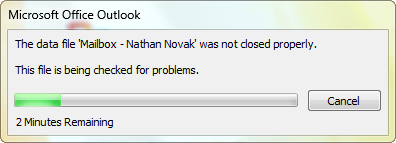
In the mean time, time will continue to be spent sitting and waiting … and fuming.
Windows Live Messenger and Windows 7 tip
I really love Windows 7 and am happily using it on my primary laptop. The so far the only thing that doesn’t work is my AT&T wireless modem (need to find a driver installer that doesn’t care about the OS version).
One issue that I haven’t liked is the Windows Live Messenger client wants to live in the taskbar with the rest of my running apps instead of the system tray where I’m used to it staying. But I just came across a way to make it work like I want and stay over by the clock in the system tray: compatibility mode!
Here’s what to do:
- Close/exit Messenger
- On your local computer browse to C:\Program Files\Windows Live\Messenger\ (or \Program Files (x86)\ on a 64bit OS install)
- Right-click on msnmsgr.exe and choose Properties
- On the Compatibility tab click the “Run this program in compatibility mode box and choose Windows Vista. Click OK at the bottom.
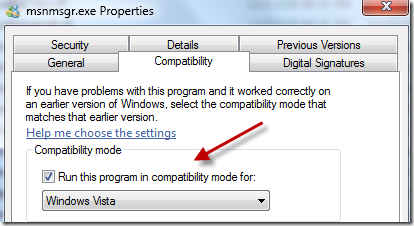
- Now you can start Messenger again from the Start Menu.
- In the System Tray click on the “Show hidden icons” arrow and then click Customize.
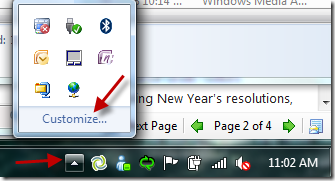
- In the Notification Area Icons dialog find Windows Live Messenger and in the dropdown to the right choose “Show icons and notifications”. Click OK at the bottom.
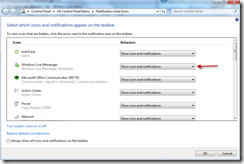
- There you go! Messenger back in the System Tray!
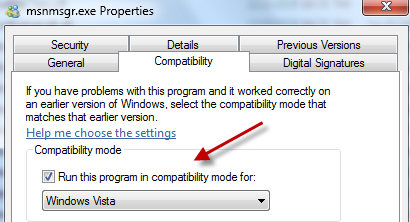


Credit to www.mess.be for the tip! Unfortunately they don’t have URL’s directly to their posts.
I’m not dead yet!
Just wanted to let you all know that I’m still around! 🙂
You may have noticed that I’ve added a couple of links/feeds to the right of this page. The first one is my Twitter account: http://twitter.com/nanovak. I have actually been quite active over there as I find the 140 character short post syncs up well with my usual desire for blogging: oh that would be a cool thought or quote to share.
The other feed is a “link blog” feed of blog posts and articles that I find interesting to share. Some good stuff there! http://feeds.feedburner.com/NathansLinkBlog
I’m starting to get motivate to write a 2008 year in review post, so stay tuned for that.
For now, it’s off to bed to try to get rid of a head cold. Joy.

Wassup!!! [revisited]
Just came across this in catching up on TechCrunch posts. Pretty funny revisiting of characters from the old Budweiser commercials from 1999-2002 … eight years later.
Where’s the grocery store?
A new grocery store is going to open in our town. Well, reopen under new ownership after the last group went all Chapter 11 on us. This has led to some considerable discussion on the various email DL’s and other online forums for folks who live in Snoqualmie.
The best post I’ve seen just came in while I was at lunch, and is in response to my beautiful wife pointing out that a newspaper article said people in Snoqualmie were driving half an hour to get to a grocery store.
But then he got a phone call from a retail developer at Snoqualmie Ridge, who said the community’s only supermarket had closed and residents were driving a half hour to shop for food.
–Puget Sound Business Journal
What a load of bull the retail landlord fed these people! There’s a small organic grocery in downtown Snoqualmie (3-5 minutes) as well as a QFC and Safeway 6 miles away in North Bend. The response?
“Not sure where people would get information line that…” 
Thanks Chris!

 Nathan's Occasional Blog